— Website & Support —
For sole proprietors and small shops'
Website creation is,
We do not “just make it and be done”.
Website building and step-by-step support
for small shops and sole proprietors.
Hello. I am Ena of ENA BLEND. I have worked for more than 10 years in the IT industry in SOP (procedure manual) operations, help desk work and customer support, and I have also been involved in service operations management and quality management for websites and site operations. Now, as a sole proprietor, while gradually growing my own shop's website, for people starting a small shop or a business on their own,Website production and set-up supportwe are doing.
On this page, rather than listing what I can do, I have written, together with my own experience, why I do not want to “just make it and be done”. It is a rather long page, but I would be glad if you use it as material for thinking about whether to consult us.
LP creation ¥9,800 plan
This is a plan for people who think “I just want to have one page first”. We have kept the price down by using a shared-work system, where you prepare materials such as texts and photos. For preparing the materials, we will give you a checklist, so you just need to gather them following it.
¥9,800Tax included
It is listed on Coconala at ¥10,000 (due to fees)
You can choose the design from 3 templates
We have 3 base design templates. After you apply, we will propose up to 3 designs, so please choose one that suits your shop's atmosphere.
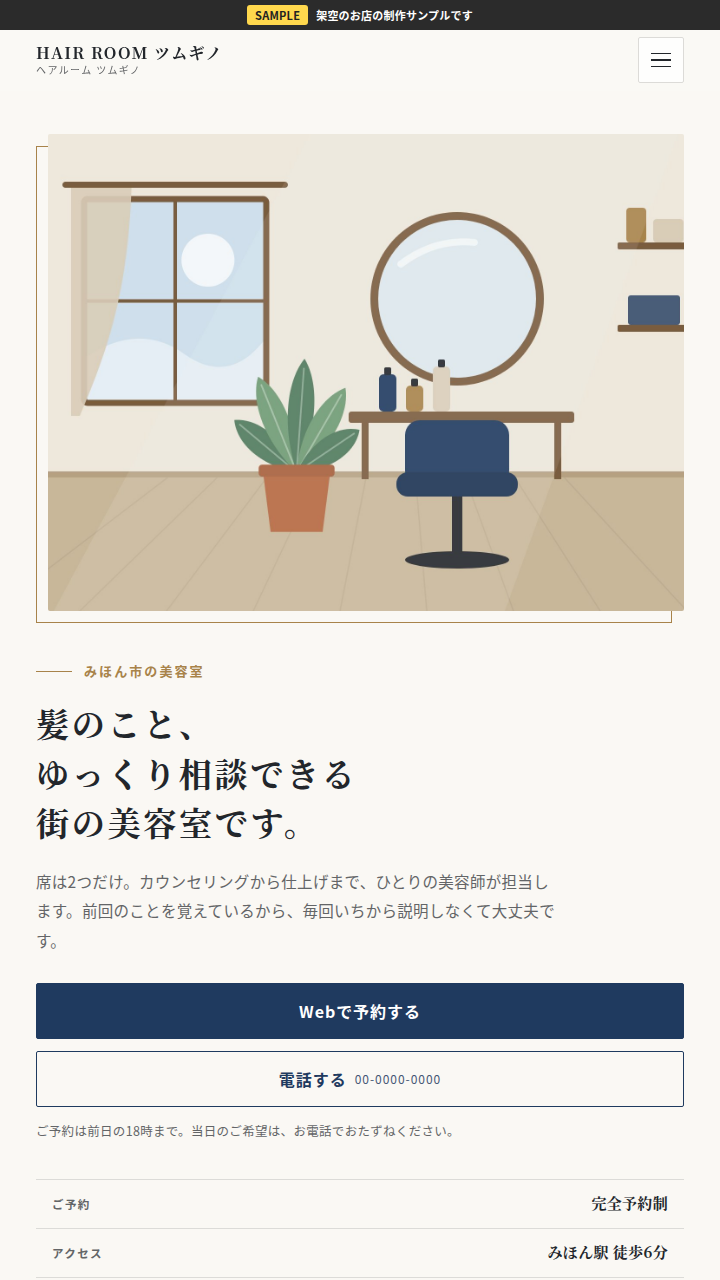
An atmosphere with a sense of trust. For shops, clinics, professional offices and so on
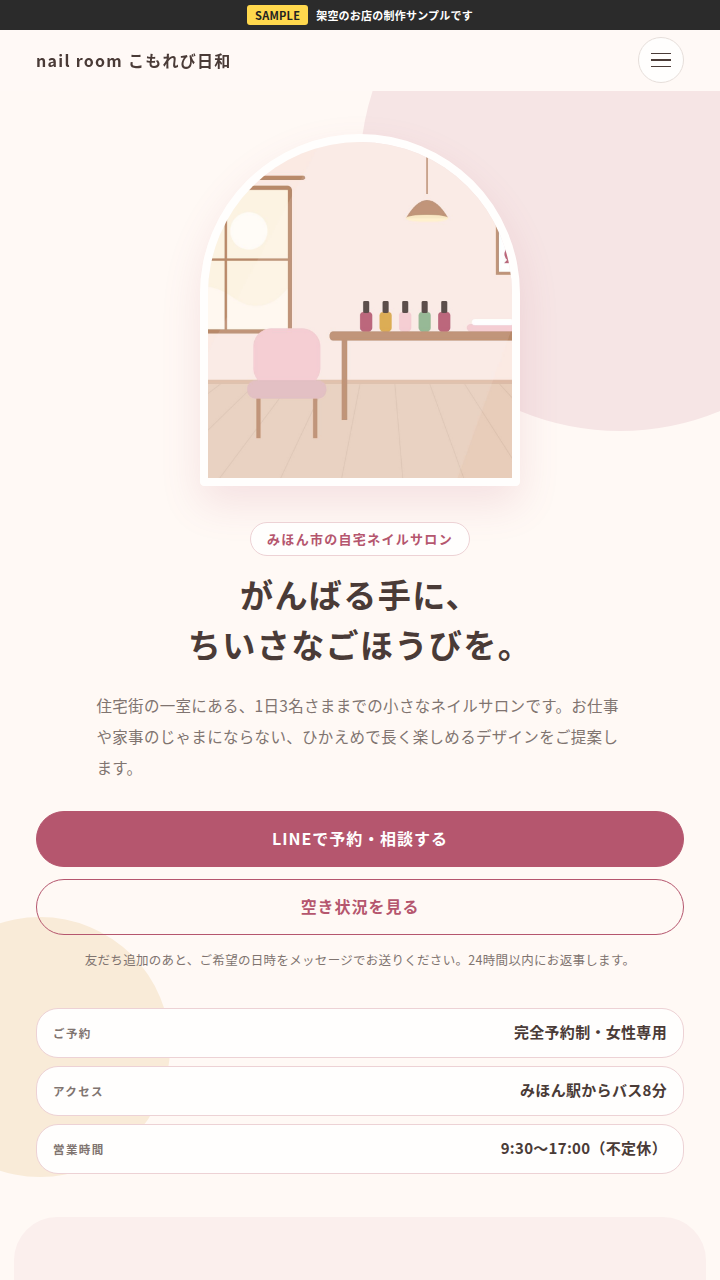
A gentle atmosphere. For salons, nail salons, classes and so on
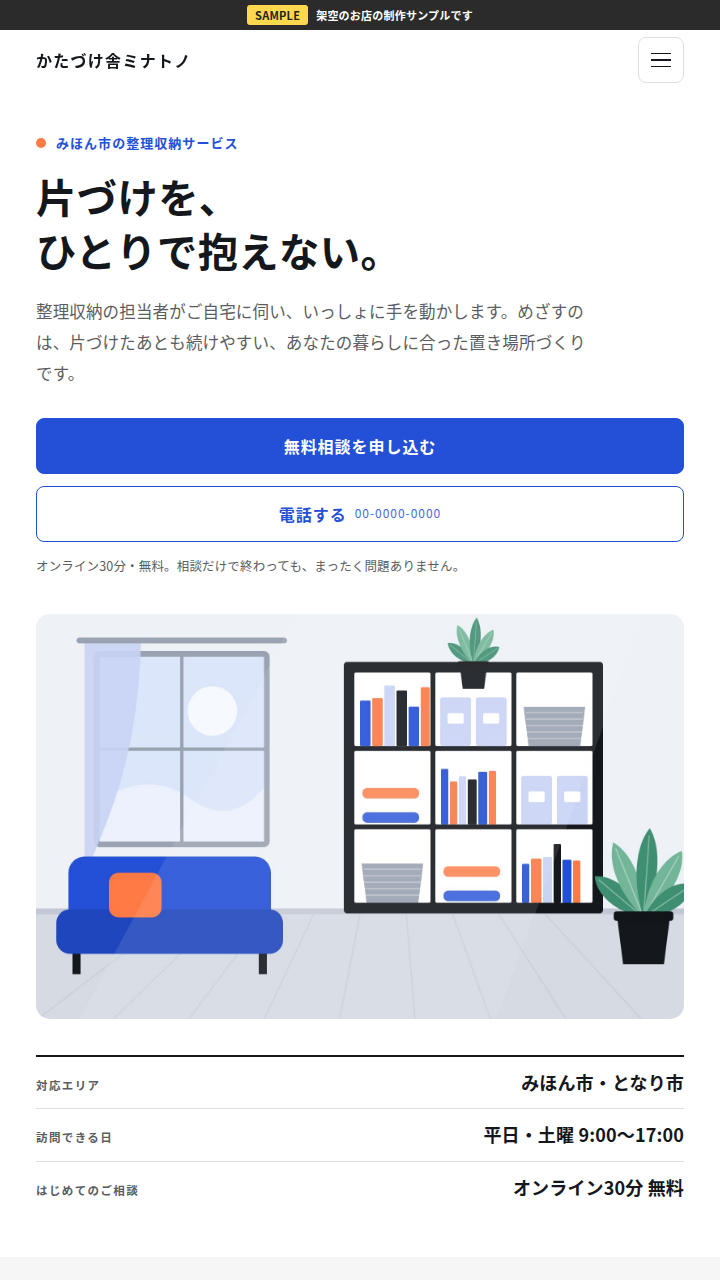
A clean, neat atmosphere. For services in general
*The screen is a sample. It is an example made with a fictional shop, and is not an actual customer's page.
The video inside the monitor is a recording of an actual screen
We have features to have people read to the end
We can also make small scroll games that you can paste onto your shop's page.
The videos are recordings of the actual screens being played
As you scroll while reading, the paper plane travels through the sky. At milestones along the way, a short message from the shop is displayed, and at the goal, it is made so that it can deliver you to buttons guiding you to the official LINE account or booking page.
Long pages are often closed without being read to the end. Adding a small bit of fun like this makes reading through a little more enjoyable. Besides the paper plane, we also have design variations matched to your shop's industry, such as cars, skiing and trains.
Try actually playingA “Squeeze LP” that feels good to touch
We can now make an LP where, wherever you touch the page, it sinks, stretches and slowly returns. Before reading the text, please touch it first.
Pastel version (sweets and bread shop)
The videos are recordings of the actual screens
A demo you can actually touch: Pastel versionLuxury version (high-end patisserie)
The videos are recordings of the actual screens
A demo you can actually touch: Luxury version+¥19,800 as a set with LP creation / ¥24,800 for an add-on to an LP you already have only (not included in the ¥9,800 plan)
- You can choose the look from 2 types: the Pastel version and the Luxury version
- It can also be added later to an LP you already have
- With the “View Normally” button, you can return to the normal display at any time
1. I want to make a website, but… Do you have troubles like these?
What I hear most in website consultations is “I don't know what to ask for first”. The reasons people stop before that point mostly come down to the following 3.
I registered with a free creation service, but partway through I stopped understanding, and it stayed that way for months. I did not even know what to ask first. ……Honestly, when I first started making my own site, I also stopped at a similar place.
We have a website, but both the prices and opening hours are still old. I don't know how to fix them, and I feel awkward asking the company that made it.
I got a quotation and it was higher than I expected, and the explanations were full of katakana terms too. I want to order only the “things I really need”, but I have nothing to compare with.
Some of you may have arrived at this page searching because you thought “Website creation seems expensive for a sole proprietor” or “Where should I ask for a website for a small shop?”. If even one of these applies to you, please read a little further.
— What I have seen on the front line of support —
Working in customer support, I often come across consultations like “We have a website, but we have not touched it for years”. Prices have changed and stayed that way, opening hours have changed and stayed that way. People feel awkward asking the company that made it, so it is left as it is.
I always think it is a waste. The site itself is not bad. It is just that the “how to use it” after it was made has not been handed over. The reason I am committed to set-up support is that I have seen this scene many times.
2. On my shop's site, you can actually touch them
— About my site —
ENA BLEND's website is something I have gradually grown myself. It was not in its current form from the start; I added product pages, added a chat that answers questions, and in that way increased it one by one, starting from what I could do.
There is also a page called “Seashell Bookshelf”, where books for each industry are arranged on a shelf of shells. That is entirely my own bit of fun. But I feel that a site with a small “favourite” like this in it is enjoyable for the person making it too, and conveys something to the people who see it.
Because having you touch things is quicker than explaining in writing. Please try the real examples on my site, if you like. This page itself is also one of the creation examples.
- Question Chat (FAQ Chat)
This is a chat that answers questions, actually running on the top page. A system for accepting customers' “frequently asked questions” can be added in a form like this.
Try touching it on the top page - Mini-Game Demo Page
This is a demo page for small games you can paste onto your shop's website. You can actually play all of them. We made them as one way to have customers view your site for longer.
Try playing on the demo page - Official LINE account (you can try the automatic replies)
When you add us as a friend and send an industry word such as “Salon” or “Class”, sample examples are automatically sent back to you. Building systems for your shop's LINE starts from places like this.
Try it on LINE
— That there are people who read —
The other day, when I wrote an article with message examples on note (a service where you can publish writing), I received a “Like” and a comment from a hairdresser who actually runs a hair salon. It was exactly the reader I had imagined.
I was happy, truly. But what was even bigger was realising “Ah, it does reach people”. When you know there are people reading, you can keep going with both your site and your articles. I think this feeling is probably the same for a shop's website.
It does not end with just making it.
A website does not end once you have made it and published it. When I create one, I also think together with you about the “systems” that will help with your shop's work after publishing. Everything listed here is a real, working example that I actually run on my own site and official LINE account. Rather than reading explanations, please touch and check them for yourself.
- Frequently asked questions chat
You can add a chat to your website that answers customers' “frequently asked questions” on the spot. On my site, it is actually running on the top page. The chat handles frequently asked questions such as opening hours, prices and how to book.
Try actually touching it on the top page - Automatic guidance on your official LINE account (step delivery)
This is a system where information you have decided in advance is delivered automatically 1 day, 2 days and 3 days after someone adds you as a friend. On my official LINE account, I actually run this step delivery. Combined with greeting messages and automatic replies (keyword replies), you can shape your shop's LINE so that it does not “end with registration”.
Try it on our official LINE account (add as a friend) - Free Shop-Only Tools
You can place small tools on your website that customers can use on the spot. For example, my site has a “Reply Example Generator” where, when you choose a situation, a reply text to a customer is displayed and you can copy it as it is. We can make tools like this, matched to your shop's work.
Try touching the Reply Example Generator - Touchable, moving effects (Squeeze LP)
You can also add a “touchable” effect where, wherever you touch the page, it sinks, stretches and slowly returns. There are 2 types of demo. This is an option at +¥19,800 as a set with LP creation / ¥24,800 for an add-on to an LP you already have only (not included in the ¥9,800 plan).
Demo: Try touching the Pastel version Demo: Try touching the Luxury version - Add-on parts (Treasure Hunt, Slider, Omikuji and more)
You can also add small features later to a website you already have. Such as a “Treasure Hunt Game” to explore within the site, a “Before-and-After Slider” to flip through and compare photos, a seasonal “Omikuji”, and a lamp that switches by time to show whether you are open. You can actually touch all of them in the demo collection.
Try touching the add-on parts demo collection - Accompanied support that hands over everything through to how to update
We help you in gentle words, from creating your site through to the point where you can update it yourself. After publishing, we will give you the steps for making changes, with photos. How we proceed is written further ahead in “4. The Flow of Website Creation”.
View the flow from consultation through to after publishing
Whether something is included in the price varies by plan. If there is something you are interested in, please ask “Is this included?” in a free consultation. For things that are not included, we will honestly tell you they are not included.
— Business Opening Monitor Notice (just 2 cases) —
As a Business Opening Monitor, for just 2 cases, we will accept installation of the “FAQ Chat”, “Automatic Guidance on Your Official LINE Account”, “Free Shop-Only Tools” and “Add-on Parts” above, with no installation fee. Only the installation work fee is free; website creation itself is at the usual price. This applies to add-ons to a website you already have.
The conditions are that you prepare the materials needed for installation (photos, draft texts and so on), allow us to introduce your site name and screens as an installation case study, and give us a short comment on your experience. This is not on a first-come, first-served basis; we will decide after checking the details. If you are interested, please mention “About the monitor” in a free consultation.Consult on our official LINE account
3. Not just making it. A website made by a support professional
The difference from large production companies is,Expertise for “after making it”is what I think. Before I am a person who makes websites, I am a person who has worked in customer support.
Because I am a customer support professional, I care about what happens after publishing.
I have more than 10 years of experience in SOP (procedure manual) operations, help desk work and customer support. I also have experience in service operations management and quality management for websites and site operations. At a dedicated consultation desk, I have also achieved a customer satisfaction score of 4.7 and ranked top in response performance (KPI). That is why, when I create something, what I always care about is: “After this is published, will this person have any trouble?” I believe that supporting website creation means building with foresight, right down to “I don't know how to reply to customers” and “I don't know how to update it”.
I understand the words of beauty and salons a little.
I hold Level 1 of the Japan Cosmetics Certification and Level 1 of the Cosmetic Ingredients Certification, and I have experience in sales and product planning (OEM) at a company handling cosmetic raw materials. For salon website creation, I think there will be little need for you to explain menu names and ingredient words to me one by one.
Guiding you starting from how to use it is what “set-up support” means.
Rather than just making something and handing it over, we guide you starting from how to use it itself. Steps with screen photos, and rewordings of technical terms. If people do not understand, they stop right there. Having seen that scene many times in support work, I want to deal in advance with the places where people are likely to stumble.
Of course, shops other than beauty and salons are also welcome. I think the way of proceeding that we have honed through salon website creation — “delivering words accurately” — can be useful in the same way for any industry.
4. The Flow of Website Creation: From consultation through to support after publishing
How we proceed is roughly this flow. We will decide the order and intervals together, to suit how busy your shop is.
- STEP 1Free consultation30 minutes, ¥0. Please tell us about the trouble you have now
- STEP 2Proposals and quotationsWe will show you only what is needed, together with the amounts, in advance
- STEP 3ProductionWhile showing you the progress along the way, we will check together and proceed
- STEP 4PublishingWe will publish it on the internet in a form that is easy to view on smartphones too
- STEP 5Support after publishingWe will give you the steps for making changes, with photos, and you can consult us when you have trouble
What we value in “set-up support”
- We will guide you with steps with photos: We will give you materials that let you proceed while looking at screen photos (screenshots) for how to make changes and how to use things after publishing. You can see with your eyes “where to press”.
- We do not use technical jargon: For example, we explain by rewording into everyday words, such as “domain” as “your address on the internet” and “server” as “the place to put your website”.
- We do not do everything at once: Little by little, starting from where it is needed. We will decide together on a way of proceeding that is not unreasonable, to suit how busy your shop is.
- We will show you all the amounts in advance: We will not proceed in a way where things later increase with “Actually, this was needed too”.
5. Price Guide
These are the prices for the main menu. We will write them all out in advance. If they vary depending on combinations or contents, we will tell you at the quotation stage.
| Free consultationPlease first let us hear your story (30 minutes) | ¥0 |
|---|---|
| Spot ConsultationA one-off consultation (60 minutes) for just the part you are having trouble with | ¥6,800 |
| Official LINE Starter PackWe will prepare your shop's official LINE account into a state where you can use it | ¥24,800 |
| LP creationLP = A page that introduces a product or shop on 1 page | ¥27,800 |
| LP creation ¥9,800 planMaterials such as texts and photos are to be prepared by you. Up to 3 design proposals and up to 7 sections | ¥9,800 |
| Complete Business Opening SetA set bringing together what you need, in time for your business opening | ¥46,800 |
| MaintenanceA contact point for watching over things after publishing and for small fixes | ¥2,480/month |
| Monthly Accompanied Support LightAn accompanied type where you can proceed while consulting as many times as you like in a month (limited to 3 clients) | ¥16,800/month |
The difference between the 2 LP creation plans
We often hear people say “Websites are expensive”. Coconala's official market range for LP creation is mainly ¥30,000 to ¥100,000 (updated October 2026), so honestly, that feeling is not wrong. This plan can be offered at ¥9,800 because we use a shared-work system, where you prepare the “materials” such as texts and photos.
| Items | LP creation ¥9,800 plan | LP creation (including materials and text creation) |
|---|---|---|
| Price | ¥9,800 | ¥27,800 |
| Text creation | Not included (option +¥5,000) | Included |
| Materials such as photos and logos | To be prepared by you | While hearing from you, we will prepare together |
| Design proposals | Up to 3 proposals | We will propose to suit the contents |
| Page length | Up to 7 sections | We will decide after consulting with you |
| Delivery time guide | 10 to 14 days after all materials are ready | As this varies depending on the contents, we will guide you individually |
| For people like these | I can prepare the texts and photos myself. I want to have 1 page first | I want to leave everything from text creation to you |
*What is included in the “Complete Business Opening Set” is the LP creation (¥27,800) that includes materials and text creation. If you are unsure which plan to choose, please tell us about your current situation in a free consultation. We will not push you towards the more expensive option.
Things that cost besides the fees, there is a separate cost of a few thousand yen a year for the place to put your website (server) and its address (domain). If you already have them, this is not needed. Details are also written in the “Frequently Asked Questions” below.
If, having read this far, you feel “Maybe I will try listening to a little of what they have to say”.
You can apply for a free consultation (30 minutes, ¥0) via our official LINE account.
Add the official LINE account as a friend
After adding us as a friend, if you send “Consultation”, we will guide you on the schedule from here.
6. Frequently Asked Questions
- Q. I am not good with computers and IT. Is that OK?
- That is fine. In fact, this support is for people like you. We will guide you through the operations one by one with steps with photos, and explain words by rewording them into everyday language. If you get stuck at something you do not understand, please ask us on the spot.
- Q. How long does it take until publishing?
- It varies depending on the number of pages and how much of the contents has been decided. At the free consultation, we will work out a reasonable schedule together. We will not proceed in a rushed way that causes trouble later, so please first tell us about your current situation.
- Q. After publishing, can I ask you to make corrections?
- Yes. We handle this through “Maintenance” (¥2,480/month) or a “Spot Consultation”. Please consult us about small changes too, such as changes to opening hours and prices. For those who would like to become able to make changes themselves, we will give you the steps with photos.
- Q. Are there any costs besides the fees?
- There is a separate cost of a few thousand yen a year for the place to put your website (server) and your address on the internet (domain). If you already have them, this is not needed. If they are needed, we will show you the amounts in advance at the quotation stage.
7. First, starting from talking
Thank you for reading this long page to the end. I believe that with websites, the difference comes not from making one itself, but from “whether you can keep going after making it”. I would be glad if this has reached someone who wishes there were a person to do that together with them.
Consultations saying “I don't know what to ask for first” are the most common.
You can apply for a free consultation (30 minutes, ¥0) via our official LINE account.
Add the official LINE account as a friend
After adding us as a friend, if you send “Consultation”, we will guide you on the schedule from here.
Free samples of the examples are also distributed through the same LINE account.